So I was recently asked by a client: "Why is the time on my PC 5 minutes off from my phone?"
Now this is a small environment, a very small environment (1 Server and 7 workstations). The first thing I thought about was what does the server clock look like? So I remoted into the server and sure enough it had the same time as the workstation.
I went and checked the registry and found that the server was pointed get its time from time.windows.com, but for some reason that was not working.
I then used the following command to point it to several of the pools hosted by NIST.gov
w32tm /config /manualpeerlist:time-a-g.nist.gov,time-b-g.nist.gov,time-c-g.nist.gov,time-d-g.nist.gov /syncfromflags:manual /reliable:yes /update
After that I restarted the W32Time (Windows Time) service to make the update work.
Once that is done it should force a resync of the time service which could take some time to update and to sync with all the workstations.
I hope you find this post helpful, and if so please share it with your friends.
Showing posts with label NTP. Show all posts
Showing posts with label NTP. Show all posts
Friday, August 9, 2019

Saturday, July 21, 2018
Clients are not receiving emails from Exchange
So I had a client call in today and say that they are not receiving emails. That is as descriptive as it gets sometimes, so the first thing I did was check their Mail Gateway which caches email if their Exchange server is not running. So I looked and there is nothing in the queues, so that tells me that things are making it's way to Exchange.
I then go and open the Exchange Management Shell which will tell me really quickly if the problem is what I think it is. So I fire it up and here is what I get

Note: If you try to open the web console you may have similar issues.
Having seen this message before with this particular client I know now that I have a time sync issue on my hands.
The First thing I look at is the time on the Exchange server.

Then I check the time on one of the Domain Controllers which is the PDC Emulator.

Then I check one of the other Domain Controllers and I find this.

As you can see the time difference is greater than 5 minutes which will cause your Exchange Server to be very unhappy.
Once you fix the time issue you can then try to reopen the Exchange Management Shell and you will see that you can connect without an issue.
Let me know if this was helpful by leaving a comment below.
thank you
I then go and open the Exchange Management Shell which will tell me really quickly if the problem is what I think it is. So I fire it up and here is what I get
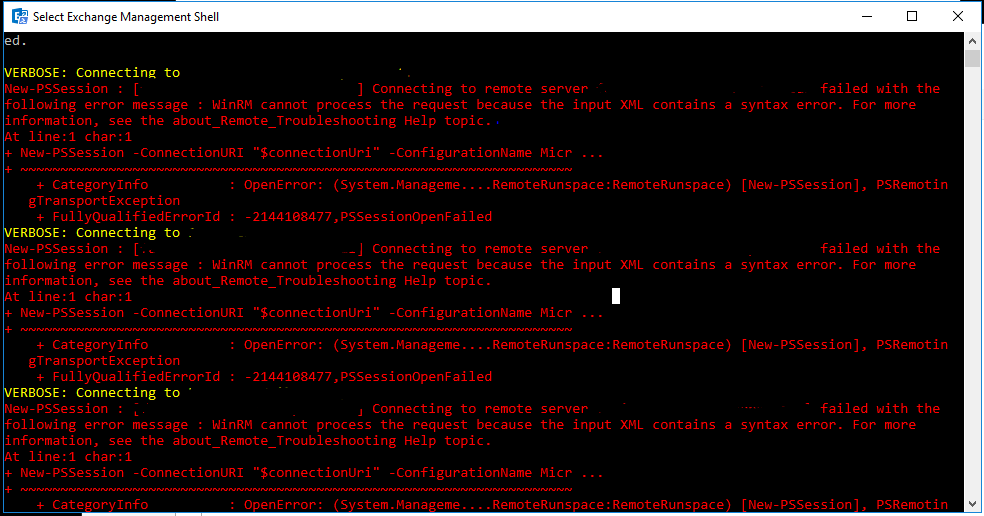
Note: If you try to open the web console you may have similar issues.
Having seen this message before with this particular client I know now that I have a time sync issue on my hands.
The First thing I look at is the time on the Exchange server.
Then I check the time on one of the Domain Controllers which is the PDC Emulator.
Then I check one of the other Domain Controllers and I find this.
As you can see the time difference is greater than 5 minutes which will cause your Exchange Server to be very unhappy.
Once you fix the time issue you can then try to reopen the Exchange Management Shell and you will see that you can connect without an issue.
Let me know if this was helpful by leaving a comment below.
thank you
Subscribe to:
Posts (Atom)
-
 In a previous Post I mentioned an issue that I had with a Certificate template on my Internal Enterprise CA not showing up when I tried to r...
 -
So I recently started working more with PowerCLI. After my time at VMWorld 2019 (which I will cover in another post) I realized how powerfu...
-
So I have been looking for ways to expand my knowledge with PowerCLI. This whole effort came about from going to VMWorld 2019 in San Francis...